Stay confident online, with patient help when you need it.
Tuno understands your computer, reads the page with you when it can, and helps with the next step in plain language.
For Windows PCs and laptops · Free for 14 days, no card needed · Then £16.35 a month, or £14.99 a month billed yearly (£179.85)
Try Tuno free for 14 days: a 30-minute taster of voice help, plus typed help and email checks for all 14 days. No card needed. Keep it for £16.35 a month, or £14.99 a month billed yearly (£179.85), with nearly an hour and a half of voice help every month.
“Bloody marvellous!”
Tuno: Hi, lovely to hear from you. What would you like help with today?
You: Hi Tuno, can you help me find an email from Sarah Mitchell in Outlook?
Tuno: Press the Control key and E once to jump to Outlook's search box.
Acted from real conversations, shortened. Tuno's words and voice are real.
Runs on Windows 10 and 11 PCs. See what you need.
- Available to UK residents
- For Windows 10 and 11 PCs
- Primary storage in the UK
- Built to UK data protection law (see Privacy Policy)
- No data selling, ever
- Cancel anytime
Real answers from Tuno
Ask about an email, and get a straight answer
Not sure about an email? Ask Tuno. It tells you in plain English what it noticed and what it would do, then you decide.
Here it is in Outlook: open the email, click “Is this email safe?”, and Tuno checks it for you.
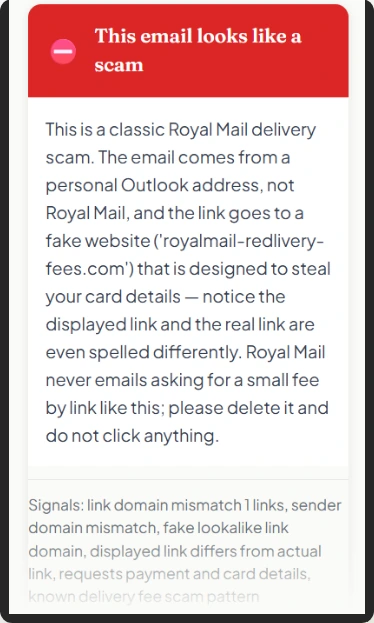
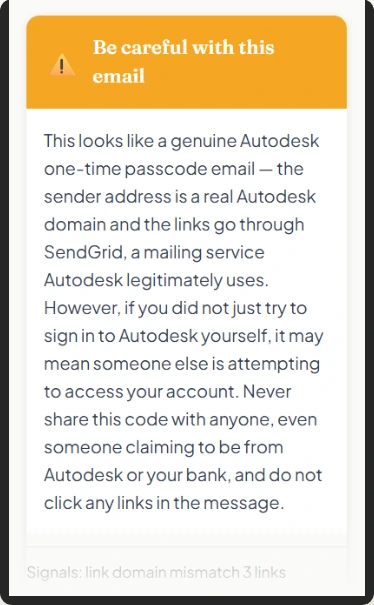
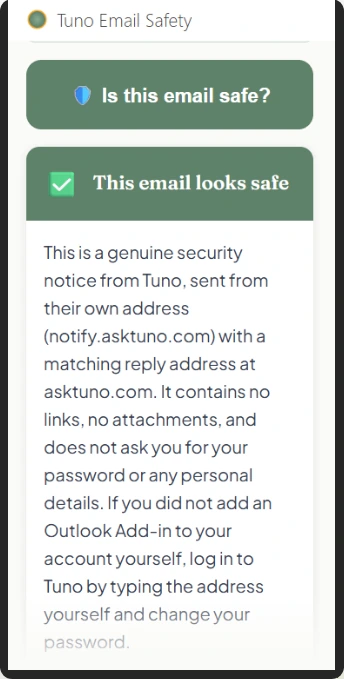
Screenshots of real answers from the Tuno add-in for Outlook. Tuno isn't connected to any company named in them.
Tell us a little about you, and we'll show you the right bits first.
I'd like help for myself
See how Tuno gives you patient, plain-English help with your own computer, and a second opinion when something feels off.
How Tuno worksI'm looking for someone I care about
A parent, a relative, a friend. See what Tuno means for them, and the reassurance it gives you.
Tuno for familiesSee Tuno in action
It remembers which phone you have
Mike wants to send a photo to his son on WhatsApp, so he asks Tuno on his computer. Tuno remembers he uses an iPhone, and talks him through the steps on his own phone, one at a time, at his pace.
- Tuno remembers what you’ve told it, so you don’t have to explain twice.
- The steps match your phone, not someone else’s.
- You stay in charge. Tuno guides you, you tap.
Tuno is an AI helper on your Windows computer. It talks you through things on your phone; it can’t see or touch it.
Plays from YouTube · 3 minutes · captions onWatch on YouTube
Some moments online just make you stop
- A text about a parcel, asking for a small “redelivery fee” before it can arrive.
- An email from “HMRC” offering a tax refund, if you just confirm your bank details.
- An email you know you kept, and now can't find anywhere.
- A letter you saved yesterday, and now it seems to have vanished.
- The printer that worked perfectly yesterday and today won't do a thing.
Some of these moments need a second opinion. Some just need patient help. Tuno is there for both.
Getting help takes three steps
1
Open Tuno
Click the little Tuno circle near the clock, or open Tuno from the Start menu.
2
Talk or type
Stuck on something? Say it or type it, in plain language. Help arrives instantly.
3
Follow along
Tuno listens, understands, and guides you one step at a time. You always do the clicking.
Things people ask Tuno
Everyday questions, answered patiently. Tuno talks you through it, and you do the clicking.
Is this email really from my bank?
Ask before you click. Tuno explains what to look for in plain English, and you decide what to do.
Send a photo from my phone in WhatsApp
Ask on your computer, and Tuno talks you through it on your phone, one tap at a time. Forgot by next week? Ask again.
Find an old email in Outlook
Tuno shows you where to look and what to type, and you find it yourself. Ask as often as you like.
Find the letter I saved yesterday
Tuno helps you find it on your computer, explains where it was, and helps you open it.
The printer won't print
Tuno works through it with you: what to check, where to look, and what to try next.
Make the writing on my screen bigger
One step at a time, in plain English, with no jargon.
One plan, nothing hidden
Free for 14 days with no card needed, then £16.35 a month, or £14.99 a month billed yearly (£179.85), with the Family Portal included. UK billing only at launch. Cancel anytime.
Feel at home with your computer again.
Try Tuno free for 14 days. No card needed.